集合排序概述
数组的排序
int[] arr= {2,3,4,5,2,1};
Arrays.sort(arr);
集合排序
使用Collection类的sort方法
sort(Listlist)
–根据元素的自然顺序对指定列表按升序进行排序,整型数据从小到大,对于字符串和字符数据,会按ASCII码值对其进行排序
案例:对整型进行排序
1
2
3
4
5
6
7
8
9
10
11
12
13
14
15
16
17
18
19
20
21
22
23
24
25
26
27
28
29
30
| package com.imooc.sort;
import java.util.ArrayList;
import java.util.Collections;
import java.util.List;
public class IntSort {
public static void main(String[] args) {
List<Integer> list=new ArrayList<Integer>();
list.add(5);
list.add(9);
list.add(3);
list.add(1);
System.out.println("排序前:");
for(int n:list){
System.out.print(n+" ");
}
System.out.println();
Collections.sort(list);
System.out.println("排序后:");
for(int n:list){
System.out.print(n+" ");
}
}
}
|
案例:对字符串进行排序
1
2
3
4
5
6
7
8
9
10
11
12
13
14
15
16
17
18
19
20
21
22
23
24
25
26
27
28
| package com.imooc.sort;
import java.util.ArrayList;
import java.util.Collections;
import java.util.List;
public class StringSort {
public static void main(String[] args) {
List<String> list=new ArrayList<String>();
list.add("orange");
list.add("blue");
list.add("yellow");
list.add("gray");
System.out.println("排序前:");
for(String s:list){
System.out.print(s+" ");
}
System.out.println();
Collections.sort(list);
System.out.println("排序后:");
for(String s:list){
System.out.print(s+" ");
}
}
}
|
编程练习1
对英文单词进行排序,效果图如下:

任务
1、 给list添加元素
2、 输出排序前list中的内容
3、对list中的元素进行排序
4、输出排序后list中的内容
1
2
3
4
5
6
7
8
9
10
11
12
13
14
15
16
17
18
19
20
21
22
23
24
25
26
27
28
29
30
31
32
33
34
35
| package me.feihong.string;
import java.util.ArrayList;
import java.util.Collections;
import java.util.List;
public class StringSort {
public static void main(String[] args) {
List<String> list=new ArrayList<String>();
list.add("orange");
list.add("tomato");
list.add("apple");
list.add("litchi");
list.add("banana");
System.out.println("排序前:");
for(String s:list) {
System.out.print(s+" ");
}
System.out.println();
Collections.sort(list);
System.out.println("排序后:");
for(String s:list) {
System.out.print(s+" ");
}
}
}
|
Comparator接口介绍
疑问:自定义的类如何排序
解决办法:使用Comparable或Comparator接口
Comparator接口:
强行对某个对象进行整体排序的比较函数
可以将Comparator传递给sort方法(如Collections.sort或 Arrays.sort)
int compare(T o1, T o2) 比较用来排序的两个参数
–如果o1<o2,返回负整数
–如果o1==o2,返回0
–如果o1>o2,返回正整数
boolean equals(Object obj)指示某个其他对象是否“等于”此Comparator
此方法可以被Object类中的equals方法覆盖,不必重写,也就是说,我们在Comparator接口中只需要重写compare这个方法
案例:对宠物猫进行排序
1
2
3
4
5
6
7
8
9
10
11
12
13
14
15
16
17
18
19
20
21
22
23
24
25
26
27
28
29
30
31
32
33
34
35
36
37
38
39
40
41
42
43
44
| package com.imooc.sort;
public class Cat {
private String name;
private int month;
private String species;
public Cat(String name, int month, String species) {
super();
this.name = name;
this.month = month;
this.species = species;
}
public String getName() {
return name;
}
public void setName(String name) {
this.name = name;
}
public int getMonth() {
return month;
}
public void setMonth(int month) {
this.month = month;
}
public String getSpecies() {
return species;
}
public void setSpecies(String species) {
this.species = species;
}
@Override
public String toString() {
return "[名字:" + name + ", 年龄:" + month + ", 品种:" + species + "]";
}
}
|
1
2
3
4
5
6
7
8
9
10
11
12
13
14
15
16
| package com.imooc.sort;
import java.util.Comparator;
public class NameComparator implements Comparator<Cat> {
@Override
public int compare(Cat o1, Cat o2) {
String name1=o1.getName();
String name2=o2.getName();
int n=name1.compareTo(name2);
return n;
}
}
|
1
2
3
4
5
6
7
8
9
10
11
12
13
14
15
16
17
18
19
20
21
22
23
24
25
26
27
28
29
30
31
32
33
34
35
36
37
| package com.imooc.sort;
import java.util.ArrayList;
import java.util.Collections;
import java.util.List;
public class CatTest {
public static void main(String[] args) {
Cat huahua=new Cat("huahua",5,"英国短毛猫");
Cat fanfan=new Cat("fanfan",2,"中华田园猫");
Cat maomao=new Cat("maomao",3,"中华田园猫");
List<Cat> catList=new ArrayList<Cat>();
catList.add(huahua);
catList.add(fanfan);
catList.add(maomao);
System.out.println("排序前:");
for(Cat cat:catList){
System.out.println(cat);
}
Collections.sort(catList, new NameComparator());
System.out.println("按名字升序排序后:");
for(Cat cat:catList){
System.out.println(cat);
}
Collections.sort(catList, new AgeComparator());
System.out.println("按年龄降序排序后:");
for(Cat cat:catList){
System.out.println(cat);
}
}
}
|
1
2
3
4
5
6
7
8
9
10
11
12
13
14
15
| package com.imooc.sort;
import java.util.Comparator;
public class AgeComparator implements Comparator<Cat>{
@Override
public int compare(Cat o1, Cat o2) {
int age1=o1.getMonth();
int age2=o2.getMonth();
return age2-age1;
}
}
|
编程练习2
定义一个学生信息类,包括学号,姓名,年龄三个成员变量,然后按名字进行升序排序。(使用Comparator接口)
运行效果图:
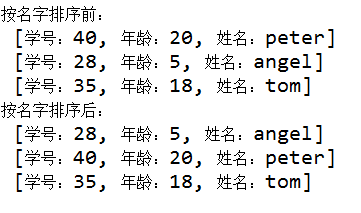
任务
1、定义学生类Student,内容如下:
- 三个成员变量:学号、姓名、年龄
- 构造方法
- getter和setter方法
- 重写toString()方法
2、定义测试类StudentTest,完成如下功能:
- 实现Comparator接口
- 在主方法中定义Student类的对象,并添加到列表中,进行排序,输出排序前和排序后的内容
1
2
3
4
5
6
7
8
9
10
11
12
13
14
15
16
17
18
19
20
21
22
23
24
25
26
27
28
29
30
31
32
33
34
35
36
37
38
39
40
41
42
43
44
45
46
47
| package me.feihong.list;
public class Student {
private int stuId;
private int stuAge;
private String name;
public Student(int stuId, int stuAge, String name) {
super();
this.stuId = stuId;
this.stuAge = stuAge;
this.name = name;
}
public int getStuId() {
return stuId;
}
public void setStuId(int stuId) {
this.stuId = stuId;
}
public int getStuAge() {
return stuAge;
}
public void setStuAge(int stuAge) {
this.stuAge = stuAge;
}
public String getName() {
return name;
}
public void setName(String name) {
this.name = name;
}
@Override
public String toString() {
return "[学号:" + stuId + ", 年龄:" + stuAge + ", 姓名:" + name + "]";
}
}
|
1
2
3
4
5
6
7
8
9
10
11
12
13
14
15
| package me.feihong.list;
import java.util.Comparator;
public class NameComparator implements Comparator<Student>{
@Override
public int compare(Student o1, Student o2) {
String name1=o1.getName();
String name2=o2.getName();
int n=name1.compareTo(name2);
return n;
}
}
|
1
2
3
4
5
6
7
8
9
10
11
12
13
14
15
16
17
18
19
20
21
22
23
24
25
26
27
28
29
30
31
32
33
34
35
36
37
38
| package me.feihong.list;
import java.util.ArrayList;
import java.util.Collections;
import java.util.List;
public class StudentTest {
public static void main(String[] args) {
Student stu1=new Student(40, 20, "peter");
Student stu2=new Student(28, 5, "angel");
Student stu3=new Student(35, 18, "tom");
List<Student> stuList=new ArrayList<Student>();
stuList.add(stu1);
stuList.add(stu2);
stuList.add(stu3);
System.out.println("按名字排序前:");
for(Student name:stuList) {
System.out.println(name);
}
Collections.sort(stuList, new NameComparator());
System.out.println("按名字排序后:");
for(Student name:stuList) {
System.out.println(name);
}
}
}
|
Comparable概述
实现排序的另一个接口:Comparable接口
此接口强行对实现他的每个类的对象进行整体排序
这种排序被称为类的自然排序,类的compareTo方法被称为它的自然比较方法
对于集合,通过调用Collection.sort方法进行排序
对于数组,通过调用Arrays.sort方法进行排序
int compareTo(T o)方法:
该对象小于,等于或大于指定对象,则分别返回负整数,0,或正整数
案例:对商品价格进行降序排序
1
2
3
4
5
6
7
8
9
10
11
12
13
14
15
16
17
18
19
20
21
22
23
24
25
26
27
28
29
30
31
32
33
34
35
36
37
38
39
40
41
42
43
44
45
46
47
48
49
50
| package com.imooc.sort;
public class Goods implements Comparable<Goods> {
private String id;
private String name;
private double price;
public Goods(String id,String name,double price){
this.id=id;
this.name=name;
this.price=price;
}
public String getId() {
return id;
}
public void setId(String id) {
this.id = id;
}
public String getName() {
return name;
}
public void setName(String name) {
this.name = name;
}
public double getPrice() {
return price;
}
public void setPrice(double price) {
this.price = price;
}
public String toString(){
return "商品编号:"+id+",商品名称:"+name+",商品价格:"+price;
}
@Override
public int compareTo(Goods o) {
double price1=this.getPrice();
double price2=o.getPrice();
int n=new Double(price2-price1).intValue();
return n;
}
}
|
1
2
3
4
5
6
7
8
9
10
11
12
13
14
15
16
17
18
19
20
21
22
23
24
25
26
27
28
29
30
31
| package com.imooc.sort;
import java.util.ArrayList;
import java.util.Collections;
import java.util.List;
public class GoodsTest {
public static void main(String[] args) {
Goods g1 = new Goods("s00001", "手机", 2000);
Goods g2 = new Goods("s00002", "冰箱", 5000);
Goods g3 = new Goods("s00003", "电视机", 3000);
List<Goods> goodsList = new ArrayList<Goods>();
goodsList.add(g1);
goodsList.add(g2);
goodsList.add(g3);
System.out.println("排序前:");
for (Goods goods : goodsList) {
System.out.println(goods);
}
Collections.sort(goodsList);
System.out.println("排序后:");
for (Goods goods : goodsList) {
System.out.println(goods);
}
}
}
|
编程练习3
定义一个员工信息类,包括编号,姓名,工资三个成员变量,要求工资定义为float类型,然后按工资进行降序排序。(使用Comparable接口)
运行效果图:
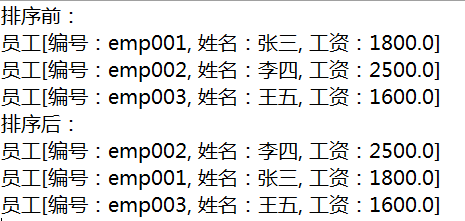
任务
1、定义员工信息类Employee,实现Comparable接口,内容如下:
- 三个成员变量:编号、姓名、工资
- 构造方法
- getter和setter方法
- 重写toString()方法
2、定义测试类EmployeeTest,完成如下功能:
- 在主方法中定义3个Employee类的对象,并添加到列表中
1
2
3
4
5
6
7
8
9
10
11
12
13
14
15
16
17
18
19
20
21
22
23
24
25
26
27
28
29
30
31
32
33
34
35
36
37
38
39
40
41
42
43
44
45
46
47
48
49
50
51
52
53
54
| package me.feihong.list;
public class Employee implements Comparable<Employee>{
private String empId;
private String name;
private double salary;
public Employee(String empId, String name, double salary) {
super();
this.empId = empId;
this.name = name;
this.salary = salary;
}
public String getEmpId() {
return empId;
}
public void setEmpId(String empId) {
this.empId = empId;
}
public String getName() {
return name;
}
public void setName(String name) {
this.name = name;
}
public double getSalary() {
return salary;
}
public void setSalary(double salary) {
this.salary = salary;
}
@Override
public String toString() {
return "员工 [编号:" + empId + ", 姓名:" + name + ", 工资:" + salary + "]";
}
@Override
public int compareTo(Employee o) {
double salary1=this.getSalary();
double salary2=o.getSalary();
int n=new Double(salary2-salary1).intValue();
return n;
}
}
|
1
2
3
4
5
6
7
8
9
10
11
12
13
14
15
16
17
18
19
20
21
22
23
24
25
26
27
28
29
30
31
32
33
34
35
36
37
38
| package me.feihong.list;
import java.util.ArrayList;
import java.util.Collections;
import java.util.List;
public class EmployeeTest {
public static void main(String[] args) {
Employee e1=new Employee("emp001", "张三", 1800);
Employee e2=new Employee("emp002", "李四", 2500);
Employee e3=new Employee("emp003", "王五", 1600);
List<Employee> empList=new ArrayList<Employee>();
empList.add(e1);
empList.add(e2);
empList.add(e3);
System.out.println("排序前:");
for(Employee emp:empList) {
System.out.println(emp);
}
Collections.sort(empList);
System.out.println("排序后:");
for(Employee emp:empList) {
System.out.println(emp);
}
}
}
|
集合排序总结
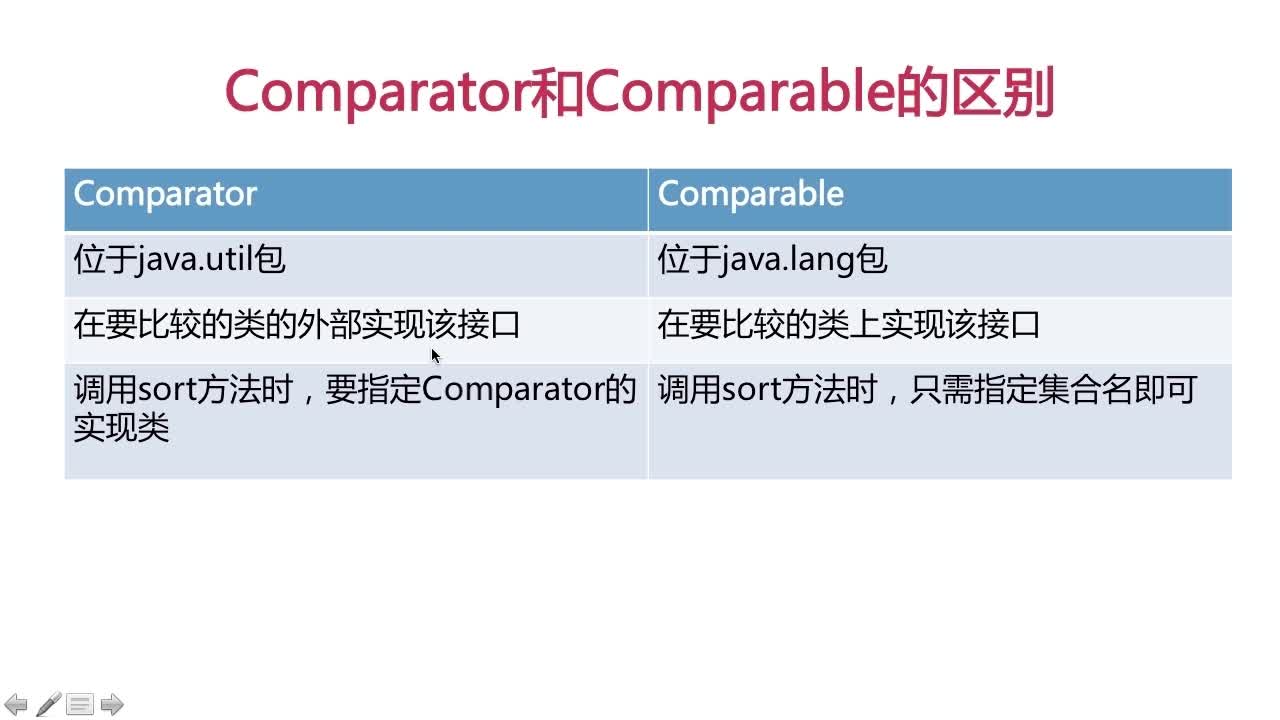
comparator和comparable接口的区别