集合概述 ①概念:Java中的集合是工具类,可以存储任意数量的具有共同属性的对象。
疑问:为什么使用集合,而不用数组呢
Java中的集合是工具类,可以存储任意数量的具有共同属性的对象
数组&集合
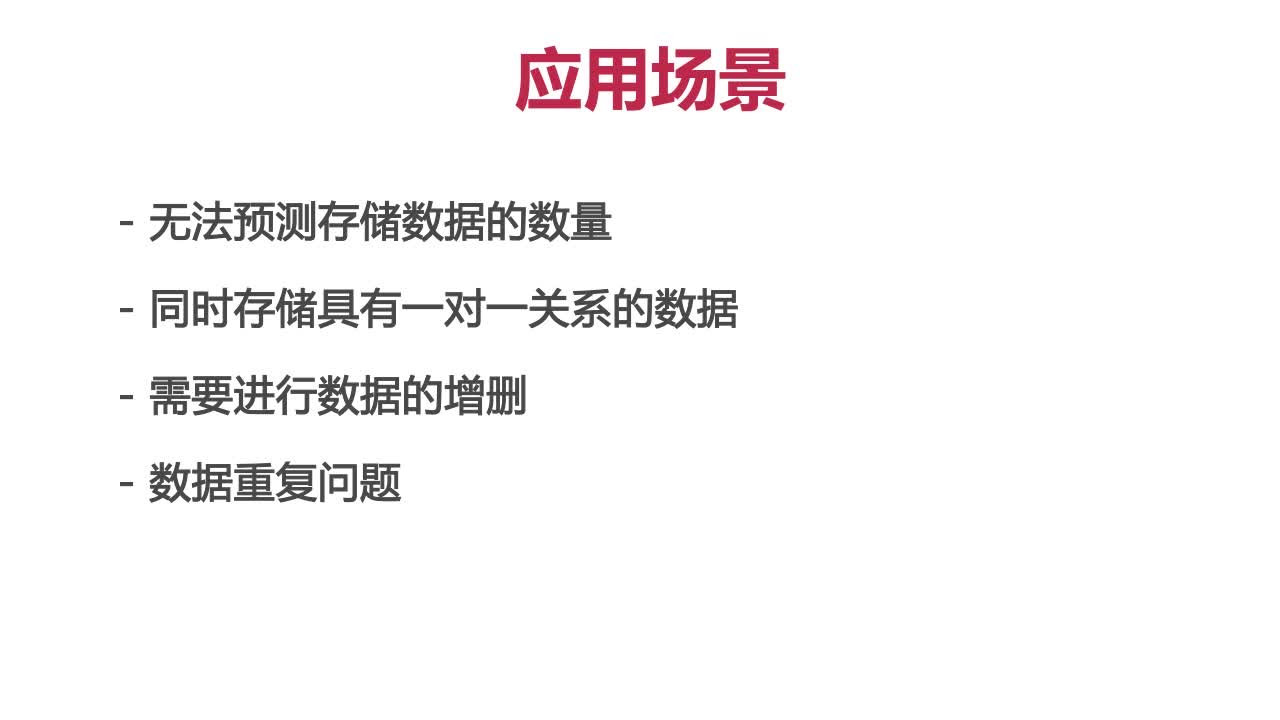
集合的应用场景
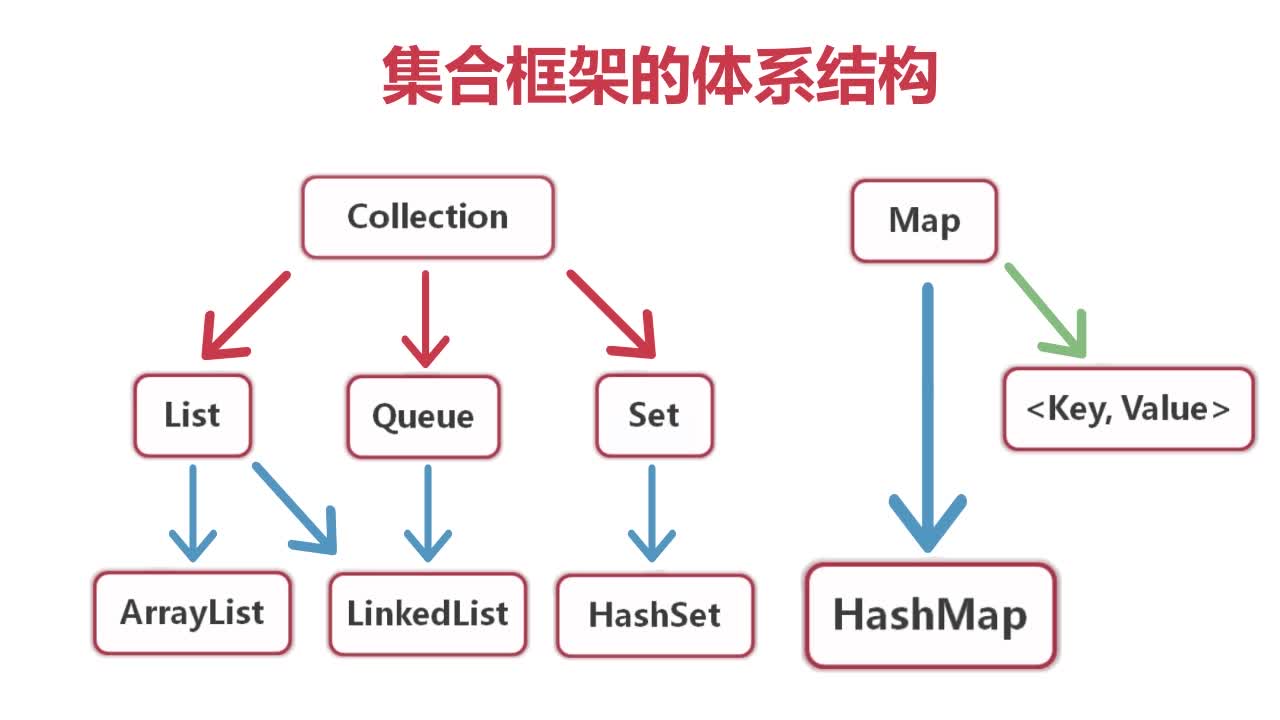
集合框架的体系结构 两类:Collection和Map
Collection中存储类的对象
Map以键值对的方式存储信息,如果存储的是商品信息,键指的就是商品编号,值就是对应编号的商品对应的信息。
List概述 List(列表)
List是元素有序并且可以重复的集合,成为序列
List可以精确的控制每个元素的插入位置,或删除某个位置的元素
List的两个主要实现类是ArrayList和LinkedList,在本课中主要介绍ArrayList类,因为这个类的使用是比较多的
ArrayList和LinkedList的数据存储方式是不一样的。ArrayList和数组比较相似,但它的数组长度可以动态增长,而且在内存中一片连续的存储空间上进行存储。LinkedList本身是一个链表,这两个类中方法的作用几乎相同。
ArrayList
集合属于java.util.*包
在List中存储并操作字符串信息 //用ArratList存储编程语言的名称并输出
1
2
3
4
5
6
7
8
9
10
11
12
13
14
15
16
17
18
19
20
21
22
23
24
25
26
27
28
29
30
31
32
33
34
35
36
package com.imooc.set;import java.util.ArrayList;import java.util.List;public class ListDemo1 public static void main (String[] args) List list=new ArrayList(); list.add("Java" ); list.add("C" ); list.add("C++" ); list.add("Go" ); list.add("swift" ); System.out.println("列表中元素的个数为:" +list.size()); System.out.println("**************************************" ); for (int i=0 ;i<list.size();i++){ System.out.print(list.get(i)+"," ); } System.out.println(); list.remove("C++" ); System.out.println("**************************************" ); System.out.println("移除C++以后的列表元素为:" ); for (int i=0 ;i<list.size();i++){ System.out.print(list.get(i)+"," ); } } }
编程练习 1使用集合ArrayList对字符串进行存储和管理。
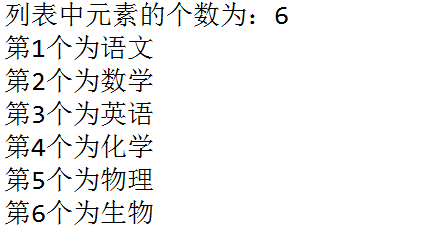
效果图:
任务
1、定义ArrayList对象
2、存储学科名称,见运行效果图
3、输出集合中元素的个数
4、遍历输出集合中的所有元素
1
2
3
4
5
6
7
8
9
10
11
12
13
14
15
16
17
18
19
20
21
22
23
24
25
26
27
package me.feihong.list;import java.util.ArrayList;import java.util.List;public class ListDemo1 public static void main (String[] args) List list=new ArrayList(); list.add("语文" ); list.add("数学" ); list.add("英语" ); list.add("化学" ); list.add("物理" ); list.add("生物" ); System.out.println("列表中元素的个数为:" +list.size()); for (int i=0 ;i<list.size();i++) { System.out.println("第" +(i+1 )+"个为" +list.get(i)); } } }
公告管理需求案例 公告管理需求:
1
2
3
4
5
6
7
8
9
10
11
12
13
14
15
16
17
18
19
20
21
22
23
24
25
26
27
28
29
30
31
32
33
34
35
36
37
38
39
40
41
42
43
package com.imooc.set;import java.util.Date;public class Notice private int id; private String title; private String creator; private Date createTime; public Notice (int id, String title, String creator, Date createTime) super (); this .id = id; this .title = title; this .creator = creator; this .createTime = createTime; } public int getId () return id; } public void setId (int id) this .id = id; } public String getTitle () return title; } public void setTitle (String title) this .title = title; } public String getCreator () return creator; } public void setCreator (String creator) this .creator = creator; } public Date getCreateTime () return createTime; } public void setCreateTime (Date createTime) this .createTime = createTime; } }
1
2
3
4
5
6
7
8
9
10
11
12
13
14
15
16
17
18
19
20
21
22
23
24
25
26
27
28
29
30
31
32
33
34
35
36
37
38
39
40
41
42
43
44
45
46
47
48
49
50
51
52
53
54
55
56
57
package com.imooc.set;import java.util.ArrayList;import java.util.Date;public class NoticeTest public static void main (String[] args) Notice notice1 = new Notice(1 , "欢迎来到慕课网!" , "管理员" , new Date()); Notice notice2 = new Notice(2 , "请同学们按时提交作业!" , "老师" , new Date()); Notice notice3 = new Notice(3 , "考勤通知!" , "老师" , new Date()); ArrayList noticeList = new ArrayList(); noticeList.add(notice1); noticeList.add(notice2); noticeList.add(notice3); System.out.println("公告的内容为:" ); for (int i = 0 ; i < noticeList.size(); i++) { System.out.println(i + 1 + ":" + ((Notice) (noticeList.get(i))).getTitle()); } System.out.println("**************************************" ); Notice notice4 = new Notice(4 , "在线编辑器可以使用啦!" , "管理员" , new Date()); noticeList.add(1 , notice4); System.out.println("公告的内容为:" ); for (int i = 0 ; i < noticeList.size(); i++) { System.out.println(i + 1 + ":" + ((Notice) (noticeList.get(i))).getTitle()); } System.out.println("**************************************" ); noticeList.remove(2 ); System.out.println("删除公告后的内容为:" ); for (int i = 0 ; i < noticeList.size(); i++) { System.out.println(i + 1 + ":" + ((Notice) (noticeList.get(i))).getTitle()); } System.out.println("**************************************" ); notice4.setTitle("Java在线编辑器可以使用啦!" ); noticeList.set(1 , notice4); System.out.println("修改后公告的内容为:" ); for (int i = 0 ; i < noticeList.size(); i++) { System.out.println(i + 1 + ":" + ((Notice) (noticeList.get(i))).getTitle()); } } }
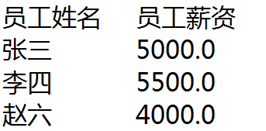
编程练习2 定义一个员工信息类Employee,使用ArrayList对员工信息进行添加和显示。
效果图:
任务
1、实现员工信息类Employee
成员变量:编号id(int),姓名name(String),薪资salary(double)
方法:构造方法和相关的get和set方法
2、定义三条员工信息添加到ArrayList中
3、将所有员工的姓名和薪资输出,见效果图
1
2
3
4
5
6
7
8
9
10
11
12
13
14
15
16
17
18
19
20
21
22
23
24
25
26
27
28
29
30
31
32
33
34
35
36
37
38
39
package me.feihong.string;public class Employee private String name; private double salary; private int id; public Employee (String name, double salary, int id) super (); this .name = name; this .salary = salary; this .id = id; } public String getName () return name; } public void setName (String name) this .name = name; } public double getSalary () return salary; } public void setSalary (double salary) this .salary = salary; } public int getId () return id; } public void setId (int id) this .id = id; } }
1
2
3
4
5
6
7
8
9
10
11
12
13
14
15
16
17
18
19
20
21
22
23
24
25
26
package me.feihong.string;import java.util.ArrayList;public class EmployeeTest public static void main (String[] args) Employee employee1 = new Employee("张三" , 5000 , 1 ); Employee employee2 = new Employee("李四" , 5500 , 2 ); Employee employee3 = new Employee("赵六" , 4000 , 3 ); ArrayList EmployeeList = new ArrayList(); EmployeeList.add(employee1); EmployeeList.add(employee2); EmployeeList.add(employee3); System.out.println("员工姓名 员工薪资" ); for (int i = 0 ; i < EmployeeList.size(); i++) { System.out.println(((Employee) (EmployeeList.get(i))).getName() + " " + ((Employee) (EmployeeList.get(i))).getSalary()); } } }
Set概述 1.Set是元素无序并且不可以重复的集合
在集合中插入字符串 案例:
1
2
3
4
5
6
7
8
9
10
11
12
13
14
15
16
17
18
19
20
21
22
23
24
25
26
27
28
29
30
31
32
33
34
35
36
37
38
39
package com.imooc.set;import java.util.HashSet;import java.util.Iterator;import java.util.Set;public class WordDemo public static void main (String[] args) Set set = new HashSet(); set.add("blue" ); set.add("red" ); set.add("black" ); set.add("yellow" ); set.add("white" ); System.out.println("集合中的元素为:" ); Iterator it = set.iterator(); while (it.hasNext()) { System.out.print(it.next() + " " ); } System.out.println(); set.add("white" ); it = set.iterator(); System.out.println("**************************" ); System.out.println("插入重复元素后的输出结果为:" ); while (it.hasNext()) { System.out.print(it.next() + " " ); } } }
显示集合的内容,由于没有set.get()方法,要引用到迭代器Iterator
hasNext()方法检测集合中是否还有下一个元素
next()方法返回集合中的下一个元素
迭代器的遍历流程
宠物猫信息管理案例 通过案例:
宠物猫类的属性
1
2
3
4
5
6
7
8
9
10
11
12
13
14
15
16
17
18
19
20
21
22
23
24
25
26
27
28
29
30
31
32
33
34
35
36
37
38
39
40
41
42
43
44
45
46
47
48
49
50
51
52
53
54
55
56
57
58
59
60
61
62
63
64
65
66
package com.imooc.set;public class Cat private String name; private int month; private String species; public Cat (String name, int month, String species) super (); this .name = name; this .month = month; this .species = species; } public String getName () return name; } public void setName (String name) this .name = name; } public int getMonth () return month; } public void setMonth (int month) this .month = month; } public String getSpecies () return species; } public void setSpecies (String species) this .species = species; } @Override public String toString () return "[姓名:" + name + ", 年龄:" + month + ", 品种:" + species + "]" ; } @Override public int hashCode () final int prime = 31 ; int result = 1 ; result = prime * result + month; result = prime * result + ((name == null ) ? 0 : name.hashCode()); result = prime * result + ((species == null ) ? 0 : species.hashCode()); return result; } @Override public boolean equals (Object obj) if (this ==obj) return true ; if (obj.getClass()==Cat.class){ Cat cat=(Cat)obj; return cat.getName().equals(name)&&(cat.getMonth()==month)&&(cat.getSpecies().equals(species)); } return false ; } }
1
2
3
4
5
6
7
8
9
10
11
12
13
14
15
16
17
18
19
20
21
22
23
24
25
26
27
28
29
30
31
32
33
34
35
36
37
38
39
40
41
42
43
44
45
46
47
48
49
50
51
52
53
54
55
56
57
58
59
60
61
62
63
64
65
66
67
68
69
70
71
72
73
74
75
76
77
78
79
80
81
82
83
84
85
86
87
88
89
90
91
92
93
94
95
package com.imooc.set;import java.util.HashSet;import java.util.Iterator;import java.util.Set;public class CatTest public static void main (String[] args) Cat huahua = new Cat("花花" , 12 , "英国短毛猫" ); Cat fanfan = new Cat("凡凡" , 3 , "中华田园猫" ); Set<Cat> set = new HashSet<Cat>(); set.add(huahua); set.add(fanfan); Iterator<Cat> it = set.iterator(); while (it.hasNext()) { System.out.println(it.next()); } Cat huahua01 = new Cat("花花" , 12 , "英国短毛猫" ); set.add(huahua01); System.out.println("**********************************" ); System.out.println("添加重复数据后的宠物猫信息:" ); it = set.iterator(); while (it.hasNext()) { System.out.println(it.next()); } System.out.println("**********************************" ); Cat huahua02 = new Cat("花花二代" , 2 , "英国短毛猫" ); set.add(huahua02); System.out.println("添加花花二代后的宠物猫信息:" ); it = set.iterator(); while (it.hasNext()) { System.out.println(it.next()); } System.out.println("**********************************" ); if (set.contains(huahua)) { System.out.println("花花找到了!" ); System.out.println(huahua); } else { System.out.println("花花没找到!" ); } System.out.println("**********************************" ); System.out.println("通过名字查找花花信息" ); boolean flag = false ; Cat c = null ; it = set.iterator(); while (it.hasNext()) { c = it.next(); if (c.getName().equals("花花" )) { flag = true ; break ; } } if (flag) { System.out.println("花花找到了" ); System.out.println(c); } else { System.out.println("花花没找到" ); } for (Cat cat : set) { if ("花花二代" .equals(cat.getName())) { set.remove(cat); break ; } } System.out.println("**********************************" ); System.out.println("删除花花二代后的数据" ); for (Cat cat:set){ System.out.println(cat); } System.out.println("**********************************" ); boolean flag1=set.removeAll(set); if (set.isEmpty()){ System.out.println("猫都不见了。。。" ); }else { System.out.println("猫还在。。。" ); } } }
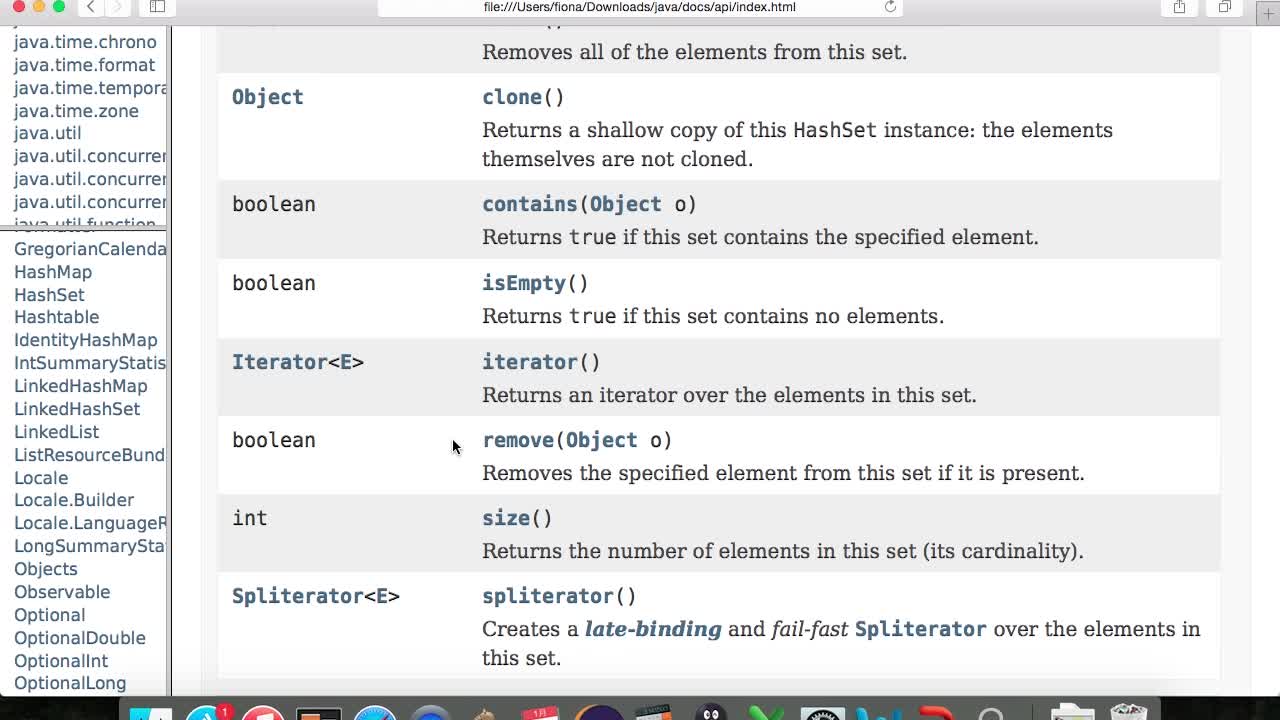
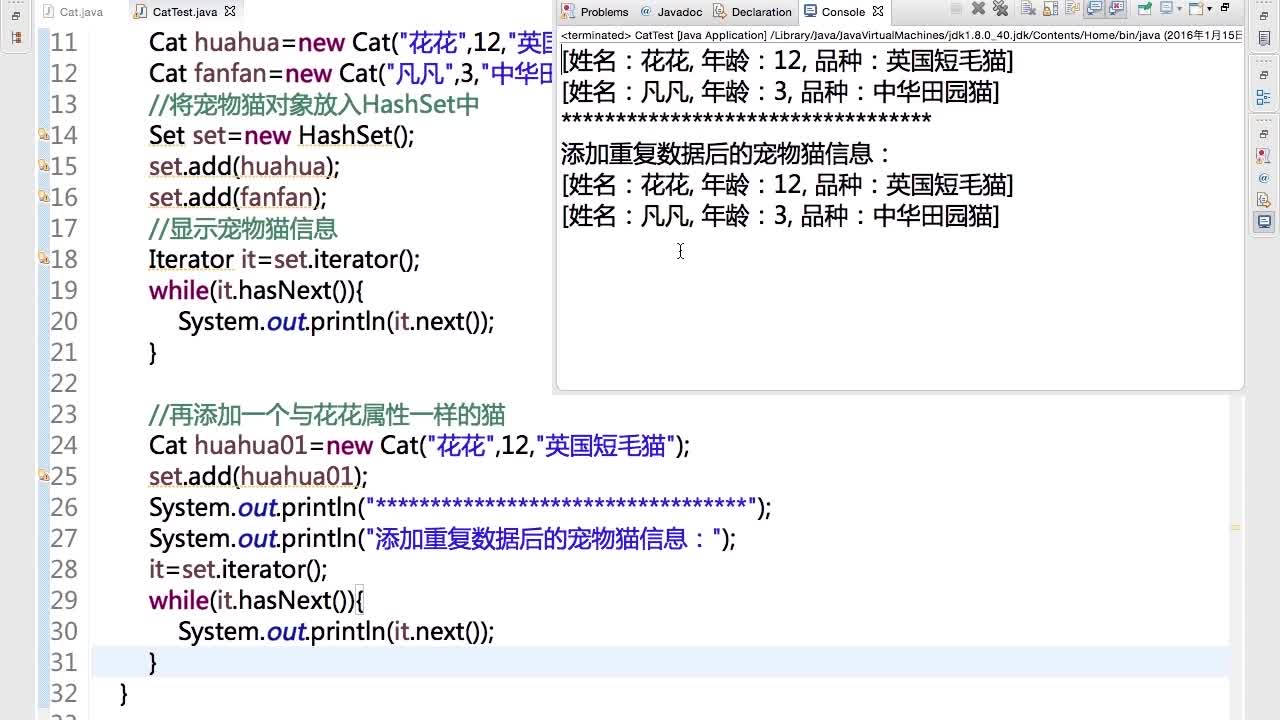
添加重复数据 1 2 3 4 5 6 7 8 9 10 11 12 13 14 15 16 17 18 19 20 21 22 23 24 25 疑问:之前相同的字符串不允许添加到集合呀? 这就涉及到Object中hashSet和toString的使用方法了 所以我们要在Cat类中重写hashCode和equals方法 hashCode方法:哈希表,属于数据结构里的知识,可以提高数据的存储速度。可以用eclipse自动生成。 原理:举三个桶的例子 hashCode判断元素在哪个桶里,equals判断桶里哪个是我们要找的 public int hashCode(){ final int prime = 31; int result = prime*result + month; result = prime*result + ((name == null)?0 : name.hashCode()); result = prime*result + ((species == null) ? 0 : species.hashCode()); return result; } public boolean equals(Qbject obj){ //判断对象是否相等,相等则返回true,不用继续比较属性了 if(this==obj) return true; //判断obj是否是Cat类的对象,如果是,则强制转换,返回属性的比较结果 if(obj.getClass()==Cat.calss){ Cat cat = (Cat)obj; return cat.getName().equals(name)&&(cat.getMonth()==month)&&(cat.getSpecies().equalx(species)); } return false; } 有了这两个方法以后,在测试类中再添加相同的对象,就无法添加成功了
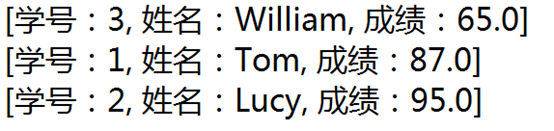
编程练习3 定义一个学生类,使用HashSet对学生类的对象进行管理:执行添加操作,然后解决重复数据的添加问题。
效果图:
任务:
1、 定义一个学生类Student
(1)属性为:学号stuId(int),姓名name(String),成绩score(float)
(2)方法为:构造方法,getter和setter方法,toString方法
(3)重写hashCode()和equals()方法,equals方法的判断依据是学号和姓名相等
2、定义三个Student类的对象,添加到HashSet中
3、显示HashSet中元素的内容
4、添加一个重复数据到Set中,观察输出结果
1 2 3 4 5 6 7 8 9 10 11 12 13 14 15 16 17 18 19 20 21 22 23 24 25 26 27 28 29 30 31 32 33 34 35 36 37 38 39 40 41 42 43 44 45 46 47 48 49 50 51 52 53 54 55 56 57 58 59 60 61 62 63 64 65 66 67 package me.feihong.string;public class Student private int stuId; private String name; private float score; public Student (int stuId, String name, float score) super (); this .stuId = stuId; this .name = name; this .score = score; } public int getStuId () return stuId; } public void setStuId (int stuId) this .stuId = stuId; } public String getName () return name; } public void setName (String name) this .name = name; } public float getScore () return score; } public void setScore (float score) this .score = score; } @Override public String toString () return "[学号:" + stuId + ", 姓名:" + name + ", 成绩:" + score + "]" ; } @Override public int hashCode () final int prime = 31 ; int result = 1 ; result = prime * result + ((name == null ) ? 0 : name.hashCode()); result = prime * result + Float.floatToIntBits(score); result = prime * result + stuId; return result; } @Override public boolean equals (Object obj) if (this ==obj) return true ; if (obj.getClass()==Student.class) { Student student=(Student)obj; return (student.getName().equals(name))&&(student.getStuId()==stuId); } return false ; } }
1
2
3
4
5
6
7
8
9
10
11
12
13
14
15
16
17
18
19
20
21
22
23
24
25
26
27
28
29
30
31
32
33
34
35
36
37
package me.feihong.string;import java.util.HashSet;import java.util.Iterator;import java.util.Set;public class StudentTest public static void main (String[] args) Student stu1=new Student(1 , "Tom" , 87 ); Student stu2=new Student(2 , "Lucy" , 95 ); Student stu3=new Student(3 , "William" , 65 ); Set set=new HashSet(); set.add(stu1); set.add(stu2); set.add(stu3); Iterator it=set.iterator(); while (it.hasNext()) { System.out.println(it.next()); } System.out.println("*******分割线***********" ); System.out.println("添加重复数据到Set中的输出结果:" ); Student stu4=new Student(1 , "Tom" , 87 ); set.add(stu4); it=set.iterator(); while (it.hasNext()) { System.out.println(it.next()); } } }
删除宠物猫信息 1 2 3 4 5 6 7 8 9 10 11 12 13 14 15 16 17 18 19 20 21 22 23 24 25 26 27 28 29 30 31 32 33 34 35 36 37 38 39 40 41 42 43 44 45 1.加入泛型之后,就不用进行强制类型转换了,因为泛型先定了在集合当中添加的数据必须是我们所需要的类型 加入泛型所要执行的操作如下: ①创建set对象时加<Cat> <Cat> Set<Cat> set = new HashSet<Cat>(); ②迭代器创建时加<Cat> Iterator<Cat>it = set.iterator(); ============================== 综上,就不用在c = it.next();语句中添加强制类型转换了 2. //删除花花二代的信息并重新输出 for(Cat cat : set){ if("花花二代".equals(cat.getName())){ set.remove(cat); break; //不要忘了这个break语句,由于集合规定在读取数据的时候,不可以删除数据,所以要加一个break,只要找到满足条件的语句,就不再进行遍历过程,不过这样做只适合有一个符合条件的信息的情况,如果有多个需要删除的怎么办,详见下文 } } System.out.println("删除花花二代后的数据"); for(Cat cat : set){ System.out.println(cat); } ============================== //删除集合中的所有宠物猫信息 boolean flag1 = set.removeAll(set); //removeAll方法返回布尔类型 if(flag1){ System.out.println("猫都不见了。。。"); }else{ System.out.println("猫还在。。。"); } ============================== 有多个数据需要删除,比如删除所有2岁以下猫的信息 set.removeAll(set);此句括号中的集合可以是set的子集 Set<Cat> set1 = new HashSet<Cat>(); for(Cat cat : set){ if(Cat.getMonth()<5){ set1.add(cat); } } set.removeAll(set1); //也就是从set中移去set1包含的所有元素 注意:集合的特点就是,在读取数据的时候,是不允许进行数据的删除的。 如果在进行查询时,刚好查询到的是集合的最后一个元素,此时在循环中删除是没问题的,因为删除后不会再进行遍历了。或者是在if语句中执行删除操作后,调用break结束遍历也不会报错。 但是,当删除的元素不是集合中最后一个元素,而且删除完数据后还需要再次遍历,这时候就会报错。 删除花花二代时,花花二代正好是集合的最后一个元素,所以没报异常,而花花不是最后一个元素,所以就报异常了。
Map概述
其中的数据是以键值对(key-value)的形式存储的
key-value以Entry类型的对象实例存在
可以通过key值快速的查找value
一个映射不能包含重复的键
每个键最多映射一个值
基于哈希表的Map接口的实现
允许使用null值和null键
key值不允许重复
HashMap中的Entry对象是无序排列的
案例:在字典中添加内容并显示 1 2 3 4 5 6 7 8 9 10 11 12 13 14 15 16 17 18 19 20 21 22 23 24 25 26 27 28 29 30 31 32 33 34 35 36 37 38 39 40 41 42 43 44 45 46 47 48 49 50 51 52 53 54 55 56 57 58 59 60 61 package com.imooc.set;import java.util.HashMap;import java.util.Iterator;import java.util.Map;import java.util.Map.Entry;import java.util.Scanner;import java.util.Set;public class DictionaryDemo public static void main (String[] args) Map<String,String> animal=new HashMap<String,String>(); System.out.println("请输入三组单词对应的注释,并存放到HashMap中" ); Scanner console=new Scanner(System.in); int i=0 ; while (i<3 ){ System.out.println("请输入key值(单词):" ); String key=console.next(); System.out.println("请输入value值(注释):" ); String value=console.next(); animal.put(key, value); i++; } System.out.println("*****************************************" ); System.out.println("使用迭代器输出所有的value:" ); Iterator<String> it=animal.values().iterator(); while (it.hasNext()){ System.out.print(it.next()+" " ); } System.out.println(); System.out.println("*****************************************" ); System.out.println("通过entrySet方法得到key-value:" ); Set<Entry<String, String>> entrySet=animal.entrySet(); for (Entry<String, String> entry:entrySet){ System.out.print(entry.getKey()+"-" );; System.out.println(entry.getValue()); } System.out.println(); System.out.println("*****************************************" ); System.out.println("请输入要查找的单词:" ); String strSearch=console.next(); Set<String> keySet=animal.keySet(); for (String key:keySet){ if (strSearch.equals(key)){ System.out.println("找到了!" +"键值对为:" +key+"-" +animal.get(key)); break ; } } } }
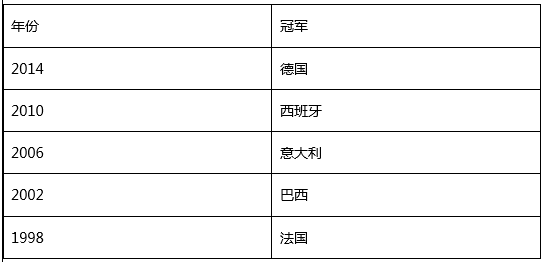
编程练习4 已知如下数据:世界杯冠军及夺冠年份。
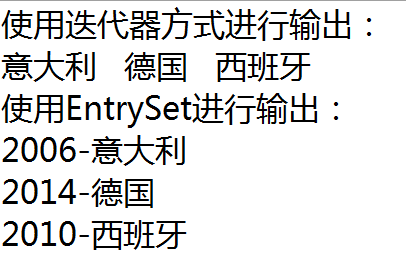
将夺冠年份作为key值,冠名队名作为value值,存储至少三条数据到HashMap中,并循环打印输出。
效果图:
1 2 3 4 5 6 7 8 9 10 11 12 13 14 15 16 17 18 19 20 21 22 23 24 25 26 27 28 29 30 31 32 33 34 35 package me.feihong.string;import java.util.HashMap;import java.util.Iterator;import java.util.Map;import java.util.Map.Entry;import java.util.Set;public class Football public static void main (String[] args) Map<String,String> football=new HashMap<String,String>(); football.put("2014" , "德国" ); football.put("2010" , "西班牙" ); football.put("2006" , "意大利" ); Iterator<String> it=football.values().iterator(); System.out.println("使用迭代器方式进行输出:" ); while (it.hasNext()) { System.out.print(it.next()+" " ); } System.out.println(); System.out.println("****************************" ); Set<Entry<String, String>> entrySet=football.entrySet(); for (Entry<String, String> entry:entrySet) { System.out.print(entry.getKey()+"-" ); System.out.println(entry.getValue()); } } }
商品信息管理案例 1 2 3 4 5 6 7 8 9 10 11 12 13 14 15 16 17 18 19 20 21 22 23 24 25 26 27 28 29 30 31 32 33 34 35 36 37 38 39 40 41 42 package com.imooc.set;public class Goods private String id; private String name; private double price; public Goods (String id,String name,double price) this .id=id; this .name=name; this .price=price; } public String getId () return id; } public void setId (String id) this .id = id; } public String getName () return name; } public void setName (String name) this .name = name; } public double getPrice () return price; } public void setPrice (double price) this .price = price; } public String toString () return "商品编号:" +id+",商品名称:" +name+",商品价格:" +price; } }
1 2 3 4 5 6 7 8 9 10 11 12 13 14 15 16 17 18 19 20 21 22 23 24 25 26 27 28 29 30 31 32 33 34 35 36 37 38 39 40 41 42 43 44 45 46 47 48 49 50 51 52 package com.imooc.set;import java.util.HashMap;import java.util.Iterator;import java.util.Map;import java.util.Scanner;import java.util.Set;public class GoodsTest public static void main (String[] args) Scanner console = new Scanner(System.in); Map<String, Goods> goodsMap = new HashMap<String, Goods>(); System.out.println("请输入三条商品信息:" ); int i = 0 ; while (i < 3 ) { System.out.println("请输入第" + (i + 1 ) + "条商品信息:" ); System.out.println("请输入商品编号:" ); String goodsId = console.next(); if (goodsMap.containsKey(goodsId)) { System.out.println("该商品编号已经存在!请重新输入!" ); continue ; } System.out.println("请输入商品名称:" ); String goodsName = console.next(); System.out.println("请输入商品价格:" ); double goodsPrice = 0 ; try { goodsPrice = console.nextDouble(); } catch (java.util.InputMismatchException e) { System.out.println("商品价格的格式不正确,请输入数值型数据!" ); console.next(); continue ; } Goods goods = new Goods(goodsId, goodsName, goodsPrice); goodsMap.put(goodsId, goods); i++; } System.out.println("商品的全部信息为:" ); Iterator<Goods> itGoods = goodsMap.values().iterator(); while (itGoods.hasNext()) { System.out.println(itGoods.next()); } } }