html初识
1
2
3
4
5
6
7
8
9
10
11
12
13
14
| <p> 内容 </p>
<input type="text" value=""/>
注意:属性只能在开始标签中定义
</br> 这是换行标签
html文档结构———首行声明(文档版本声明)一包(html标签)两段(head和body)
HTML属性
属:给予元素基本标识
性:样式或描述元素特征
通用属性/全局属性
id,class,style
特有属性
colspan,type,value
|

1
2
3
4
5
6
7
8
| <html>
<head>
<title>first.html</title>
</head>
<body>
这是第一个页面~~~
</body>
</html>
|
1
2
3
4
5
6
7
8
| <html>
<head>
<title>Hello</title>
</head>
<body>
HELLO,everyone.This is my first page!
</body>
</html>
|
字体标签

1
2
3
4
5
6
7
| 不建议使用该标签,已过时!
字体font
<font size="3" face="Helvetica" coler="red">字体</font>
属性:
size="?"字号大小
face="?"字体集如:Helvetica
color="?"字体颜色,如:red/#d8d8d8/rgb(168,178,188)
|
段落标签和注释
1
2
3
4
5
6
7
| 段落标签:
<p>xxxxxxxxxxx</p>
1.默认浏览器样式,空标签也会占位置
2.标签的默认浏览器可能造成部分问题,建议自定义
设置段落标签的属性:在head内的style中设置
p{margin:0;padding:0;}内外边距为0
|

注释标签
标题标签
1
2
3
4
| 1em=16px
user agent stylesheet浏览器默认样式
标签Heading Content共有6级:<h1></h1>.......<h6></h6>
标题1最大,标题6最小,标题的主要作用是seo优化
|

图像
1
2
3
4
5
6
7
8
9
10
11
12
13
14
15
16
17
18
19
20
21
22
23
24
25
26
27
28
29
| Html 图像
1、标签 <img />
2、作用 插入图像
3、属性 src(src这个属性是图片的地址,有这个属性才能实现图像效果。),alt
4、支持格式:PNG、JPEG、GIF、PDF(引入的PDF必须是单页的)
非标签方式:background
alt 作用是在图片无法正常显示的时候,给用户提示,告诉用户这个位置放置的是与什么相关的图片
class:标识,用来指定标签的类名
background是class的一个属性,在样式表中定义它
<style>
.imooc-logo{ -----------(. 用来匹配文档中指定类名的) background:url(http://www.imooc.com/static/img/index/log.png);
width:200px;
height:80px;
}
</style>
<p class=" .imooc-logo">
路径-----资源你在哪?
1、绝对路径
2、相对路径
注意:
如果是Windows系统,绝对路径是从盘符开始的,如C盘html文件夹下的index.html文件,路径应显示为
C:\html\logo.jpg
5-图像.html和img是同一级目录,logo.png是在5-图像.html的下一级目录下,用,/img/logo.png表示
../logo.png-------------(../就是向上翻一层)
|

链接标签
1
2
3
4
5
6
7
8
9
10
| <a href="http://www.imooc.com/" target="_blank">慕课网的新窗口</a>(打开一个新标签)
<a href="http://www.imooc.com/" target="_self">慕课网的本窗口</a>(当前页面打开)
<a href="#ooo">页面内锚点</a>(跳转到id为ooo的地方)
<h3 id="ooo"> 你好</h3>
text-decoration: none; 去掉下划线
a: visited {
color:;
} 也去掉下划线
|

列表
1
2
3
4
5
6
7
8
9
10
11
12
13
14
| <ul><li> </li></ul> 无序列表
<ol><li></li></ol> 有序列表
<dl>
<dt>定义概念的名字</dt>
<dd>概念的解释 主体</dd>
</dl> 定义列表
贴士:
1)type属性项目符号样式<ul type=""></ul>
(disc(实心圆),circle(空心圆),square(实心方形),none表示不去设置它的项目符号样式,但会保留项目符号所在的位置)不建议使用!
有序标签ol无法设置项目符号,独具特色的顺序就是他的项目符号
定义列表也无法设置其项目符号
2)只用<ul></ul> 无序列表就好了
以后看到样式,都不要通过html(或者元素本身属性)去设置,通过css
|
编程练习1
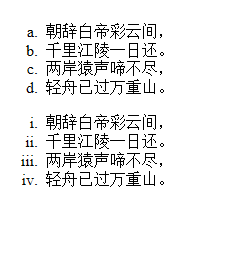
根据结果图实现效果:
1
2
3
4
5
6
7
8
9
10
11
12
13
14
15
16
17
18
19
20
21
22
23
24
| <!DOCTYPE html>
<html lang="en">
<head>
<meta charset="UTF-8">
<title></title>
</head>
<body>
<ol type="a">
<li>朝辞白帝彩云间,</li>
<li>千里江陵一日还。</li>
<li>两岸猿声啼不住,</li>
<li>轻舟已过万重山。</li>
</ol>
<ol type="i">
<li>朝辞白帝彩云间,</li>
<li>千里江陵一日还。</li>
<li>两岸猿声啼不住,</li>
<li>轻舟已过万重山。</li>
</ol>
</body>
</html>
|
HTML表格-1
1
2
3
4
5
6
7
8
9
10
11
12
13
14
15
16
17
18
19
20
21
22
23
| 表格:
<table border="1" width="50%">
<tr>
<td>列1</td>
<td>列2</td>
<td>列3</td>
</tr>
</table>
这些标签一般都不用!!!
文本格式化标签(为避免浏览器差异,一般不用)
<b>加粗</b>
<strong>加粗2</strong>
<big>大号字体</big>
<em>强调字体(斜体)</em>
<i>斜体/图标</i>
<small>小号字体</small>
<sub>下标</sub>
<sup>上标</sup>
预格式文本标签:<pre>一般这里是预览的代码</pre>
引用标签:<blockquote>引用来的</blockquote>
删除线标签:<del>删除的内容</del>
下划线标签:<ins>下划线的内容</ins>
|

1
2
3
4
5
6
7
8
9
10
11
12
13
14
15
16
17
18
19
20
21
22
23
24
25
26
27
28
29
30
31
32
33
34
35
36
37
38
| HTML表格
用于布局,呈现需要表格布局的内容
<table border=1 cellspacing="1">
<!--thead专门存放表格头-->
<thead>
<!--tr一行内的信息-->
<tr>
<th>表头1</th>
<th>表头2</th>
<th>表头3</th>
</tr>
</thead>
<!--tfoot专门存放表格尾注,一般可有可无-->
<tfoot>
</tfoot>
<!--tbody专门存放表格体-->
<tbody>
<tr align="center">
<td>表头1的内容</td>
<td>表头2的内容</td>
<td>表头3的内容 rowspan="0"</td>
</tr>
<tbody>
</table>
table 属性:
border边框大小(数字)
cellspacing单元格间距("数字")
cellpadding单元格边距("数字")
colspan单元格跨列(从左到右)("数字")
rowspan单元格跨行(从上到下)("数字")
align内容对齐("left")(在tr中设置一行的格式,在table中设置表格的格式,在tbody内设置整个tbody内的格式)
tbody便于设置整体格式
注:表格标签是块级元素
全局布局的作用已经几乎不用
表格table无法用div 取代
表格样式基本使用css设置,很少使用到以上
|

编程练习2
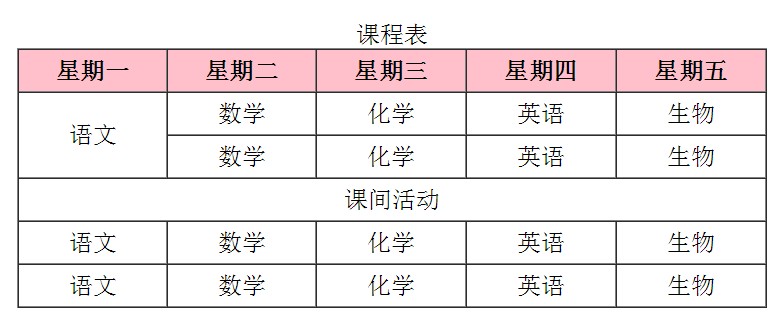
效果图:
1
2
3
4
5
6
7
8
9
10
11
12
13
14
15
16
17
18
19
20
21
22
23
24
25
26
27
28
29
30
31
32
33
34
35
36
37
38
39
40
41
42
43
44
45
46
47
48
49
50
| <head>
<title>表格属性</title>
<meta charset="utf-8">
</head>
<body>
<table border="1" width="500" cellspacing="0" cellpadding="5px" align="center">
<caption>课程表</caption>
<tr bgcolor="pink" align="center">
<th>星期一</th>
<th>星期二</th>
<th>星期三</th>
<th>星期四</th>
<th>星期五</th>
</tr>
<tr align="center">
<td rowspan="2">语文</td>
<td>数学</td>
<td>化学</td>
<td>英语</td>
<td>生物</td>
</tr>
<tr align="center">
<td>数学</td>
<td>化学</td>
<td>英语</td>
<td>生物</td>
</tr>
<tr align="center">
<td colspan="5">课间活动</td>
</tr>
<tr align="center">
<td>语文
</td>
<td>数学</td>
<td>化学</td>
<td>英语</td>
<td>生物</td>
</tr>
<tr align="center">
<td>语文</td>
<td>数学</td>
<td>化学</td>
<td>英语</td>
<td>生物</td>
</tr>
</table>
</body>
</html>
|
HTML表单-1
1
2
3
4
5
6
7
8
9
10
11
12
13
14
15
| select:下拉列表
<select>标签中设置了multiple或size属性的话select是列表了,不是下拉菜单,不设置是下拉菜单,所以代码实现了一个列表,multiple多选,size显示可见选项数目。
<select name="" id="">
<option value="" selected(设置默认值)> </option>
<option value="" > </option>
<option value="" > </option>
</select>
textarea:文本域
<style>
textarea{
resize:none;(使其没有可拖拽能力)
}
<textarea rows=""(决定有几行高) cols=""(决定有多宽)> 。。。。。(默认值) </textarea>
button:按钮
<button type=""(可以指明三个值 1、button普通按钮 2、submit 带提交行为 3、reset 重置) form="(此处应该是表单的name) ">提交(设置名字)</button>
|


编程练习3
请编写一段代码,实现如下效果图:注意不同浏览器下上传文件的显示效果会有所不同。

任务
提示:
1、注册信息使用了
标签,通过设置align属性,使其居中
2、表单部分使用了表格和表单嵌套
3、表格背景颜色为:#f2f2f2,需要设置表格宽度,使用align属性使其居中
4、“上传图片”按钮位置处的浏览效果,浏览器不同展示的效果不同
提示:文本框中的字体内容可以使用placeholder属性完成,如:
1
| <input type="text" name="username" placeholder="用户名" />
|
1
2
3
4
5
6
7
8
9
10
11
12
13
14
15
16
17
18
19
20
21
22
23
24
25
26
27
28
29
30
31
32
33
| <!DOCTYPE html>
<html lang="en">
<head>
<meta charset="UTF-8">
<title></title>
</head>
<body>
<form>
<h1 align="center">注册信息</h1>
<table bgcolor="#f2f2f2" align="center" >
<tr>
<td><label>用户名:</label></td>
<td><input type="text" name="username" placeholder="请输入用户名"></td>
</tr>
<tr>
<td><label>密码:</label></td>
<td><input type="password" name="userpassword" placeholder="请输入密码"></td>
</tr>
<tr>
<td><label>确认密码:</label></td>
<td><input type="password" name="userpassword" placeholder="请重新输入密码"></td>
</tr>
<tr>
<td><label>上传照片:</label></td>
<td><input type="file" name="userfile"></td>
</tr>
</table>
</form>
</body>
</html>
|
作业
做一个简单的注册页面
1
2
3
4
5
6
7
8
9
10
11
12
13
14
15
16
17
18
19
20
21
22
23
24
25
26
27
28
29
30
31
32
33
34
35
36
37
38
39
40
41
42
43
44
45
46
47
48
49
50
51
52
53
54
55
56
57
58
59
60
61
62
63
64
65
66
67
68
69
70
71
72
73
74
75
76
77
78
79
80
81
| <!DOCTYPE html>
<html lang="en">
<head>
<meta charset="UTF-8">
<title>Html作业</title>
</head>
<body>
<form>
<table width="500px">
<tr>
<td align="right"><label>请输入用户名:</label></td>
<td><input type="text" name=""></td>
</tr>
<tr>
<td align="right"><label>请输入密码:</label></td>
<td><input type="password" name=""></td>
</tr>
<tr>
<td align="right"><label>请再次输入密码:</label></td>
<td><input type="password" name=""></td>
</tr>
<tr>
<td align="right">性别:</td>
<td>
<input type="radio" name="xb" checked="checked">男
<input type="radio" name="xb">女
</td>
</tr>
<tr>
<td align="right"><label>兴趣爱好:</label></td>
<td><input type="checkbox" name="" checked="checked">游泳
<input type="checkbox" name="">爬山
<input type="checkbox" name="">读书
<input type="checkbox" name="">思考
</td>
</tr>
<tr>
<td align="right"><label>生日:</label></td>
<td>
<select>
<option value="2019" selected="selected">2019</option>
<option value="2016">2018</option>
<option value="2016">2017</option>
<option value="2016">2016</option>
<option value="2015">2015</option>
<option value="2014">2014</option>
</select>年
<select>
<option value="01" selected="selected">01</option>
<option value="02">02</option>
<option value="03">03</option>
<option value="04">04</option>
</select>月
<select>
<option value="01" selected="selected">01</option>
<option value="02">02</option>
<option value="03">03</option>
<option value="04">04</option>
</select>日
</td>
</tr>
<tr>
<td align="right"><label>头像:</label></td>
<td><img src="E:\PE、系统\壁纸logo\QQ图片20170121231318.jpg" width="30px">
<select>
<option value="01" selected="selected">01</option>
<option value="02">02</option>
<option value="03">03</option>
<option value="04">04</option>
</select>
</td>
</tr>
<tr>
<td colspan="2" align="center">
<input type="submit" name="" value="注册">
</td>
</tr>
</table>
</form>
</body>
</html>
|
效果图:
