使用接口的知识, 定义接口IFly,创建三个类Plane类、Bird类、Balloon类,分别重写接口中的fly( )方法,然后再测试类中进行调用。
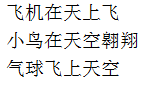
程序运行参考效果如图所示:
任务
任务分析:
1、创建接口IFly( )
方法:创建抽象方法 fly() 方法
2、创建子类:Plane
方法:实现接口中的方法fly( ),输出信息“飞机在天上飞”
创建子类:Bird
方法:实现接口中的方法fly( ),输出信息“小鸟在天空翱翔””
创建子类:Balloon(气球)
方法:实现接口中的方法fly( ),输出信息“气球飞上天空”
3、创建测试类,分别创建Plane、Bird、Balloon类的对象,调用 fly( ) 方法,输出效果参考效果图
1
2
3
4
5
6
7
8
9
10
11
| package me.feihong.fly;
public class Plane implements IFly{
@Override
public void fly() {
System.out.println("飞机在天上飞");
}
}
|
1
2
3
4
5
6
7
8
9
10
11
| package me.feihong.fly;
public class Bird implements IFly{
@Override
public void fly() {
System.out.println("小鸟在天空翱翔");
}
}
|
1
2
3
4
5
6
7
8
9
10
11
| package me.feihong.fly;
public class Balloon implements IFly{
@Override
public void fly() {
System.out.println("气球飞上天空");
}
}
|
1
2
3
4
5
6
7
8
9
10
11
12
13
14
15
16
17
18
19
20
21
| package me.feihong.test;
import me.feihong.fly.Balloon;
import me.feihong.fly.Bird;
import me.feihong.fly.IFly;
import me.feihong.fly.Plane;
public class Test {
public static void main(String[] args) {
IFly plane=new Plane();
IFly bird=new Bird();
IFly balloon=new Balloon();
plane.fly();
bird.fly();
balloon.fly();
}
}
|